Creality sits at the center of budget FDM printing. The original Ender 3 turned millions of makers into 3D printing fans because it cost less than $200, used widely available parts, and accepted nearly every common modification. That history still matters in 2026. Creality now ships updated machines with automatic leveling, direct-drive extruders, and far faster motion systems than the old V-roller Ender 3. If you are comparing brands, start with our best 3D printers 2026 roundup before narrowing to this Creality lineup. We focus on real specs, not box marketing. That keeps the comparison grounded in what you can actually print, not what a launch video claims.
Not every Creality printer serves the same purpose. Some are open-frame bedslingers built for PLA and PETG. Others are enclosed CoreXY machines that can hold chamber heat for ABS and nylon. Creality also sells resin printers for miniature painters and dental work. Your choice depends on what you build, where you keep the printer, and how much post-processing you will tolerate. We cross-checked material limits with Simplify3D’s filament guide because nozzle and bed temperatures determine which plastics you can run. That single document answers most material questions before you buy. Reading it saves time and failed prints.
Methodology matters in crowded printer lists. We selected five Creality models based on price, real speed, build volume, calibration quality, and long-term ownership costs. We did not score a printer only by its maximum speed. We considered how often a new user will need to adjust belts, level a bed, or replace a nozzle. If you have never built a printer, read how to start 3D printing before picking a model. Every machine here is available through common retail channels, and prices reflect typical street pricing as of 2026. That means a sale may shift the math.
Filament choice changes the machine you should buy. PLA prints on everything, while PETG needs stable cooling and ABS needs an enclosure. A 300°C nozzle on the K1C handles filled nylons, but an open Ender 3 V3 SE will struggle above 260°C. Use our best 3D printer filament guide to match plastic to printer. For open-source design context, Prusa Research remains a useful reference for what makes FDM printers repairable and reliable. A repairable printer is cheaper to own over five years. That matters more than a low initial price.
How Do the Top Options Compare?
| Model | Best For | Build Volume | Max Speed | Key Temp / Spec | Price |
|---|---|---|---|---|---|
| Creality Ender 3 V3 SE | Budget beginners | 220 x 220 x 250 mm | 250 mm/s | 260°C / 100°C | Check price |
| Creality Ender 3 V3 KE | Spend-friendly speed | 220 x 220 x 250 mm | 500 mm/s | 260°C / 100°C | Check price |
| Creality K1C | Enclosed high-speed | 220 x 220 x 250 mm | 600 mm/s | 300°C / 100°C | Check price |
| Creality CR-10 Smart Pro | Large projects | 300 x 300 x 400 mm | 150 mm/s | 260°C / 100°C | Check price |
| Creality Halot Mage 8K | High-detail resin | 228 x 128 x 230 mm | 170 mm/h | 8K mono LCD / UV light | Check price |
Prices are typical street estimates and shift with sales. Manufacturer speeds are maximums, not real print settings. Resin printing requires extra ventilation, gloves, and a wash and cure station.
1. Creality Ender 3 V3 SE , Best budget starter printer
Creality built this printer for first-time owners. The Ender 3 V3 SE pairs a 220 x 220 x 250 mm build volume with 250 mm/s travel speed and a direct-drive extruder. Automatic Z offset plus CR Touch leveling fixes the old Ender 3 first-layer pain. If you want a deeper beginner breakdown, see our best 3D printer for beginners guide.
The toolhead reaches 260°C and the bed reaches 100°C, enough for PLA, PETG, and TPU. That temperature range covers most starter projects and a lot of functional printing. Assembly takes about 30 minutes, and the open frame gives easy access to the hotend and belts. You can compare current pricing with Check the Creality Ender 3 V3 SE on Amazon.
The main limitation is material span. The open frame cannot hold chamber heat, so ABS and ASA will warp on larger parts. Speeds above 180 mm/s also show ringing and poor overhangs on the stock cooling fan. Treat it as a reliable 150 to 180 mm/s printer, not a 250 mm/s speed demon.
Key strengths:
- ✅ Direct-drive extruder handles flexible TPU out of the box
- ✅ Automatic Z offset and CR Touch bed leveling reduce setup frustration
- ✅ Open-source parts and large aftermarket support keep long-term costs low
- ✅ 250 mm/s travel speed is quick enough for daily printing
- ❌ Open frame cannot safely print ABS or ASA without an enclosure
- ❌ Stock part cooling limits detail quality at maximum speed
- ❌ Assembly still requires about 30 minutes and basic mechanical care
Who it’s for: Choose the Ender 3 V3 SE if you want a low-cost, no-nonsense FDM printer for PLA and PETG.
2. Creality Ender 3 V3 KE , Faster mid-range printing
A stiffer X axis separates the V3 KE from the SE. The Ender 3 V3 KE keeps the same 220 x 220 x 250 mm build area but adds a linear rail and a 500 mm/s rated top speed. The direct-drive extruder handles TPU, and the flexible PEI bed releases PLA and PETG cleanly. If you are stepping up from a used Ender 3, this is a meaningful jump.
Do not chase the 500 mm/s number out of the box. Most users will need firmware input shaping and a few test cubes before tall parts stop ringing. The realistic daily speed sits around 200 to 300 mm/s, which is still fast for a budget bedslinger. Bed adhesion on the PEI surface is strong, and the 100°C bed is standard.
There is no enclosure, so the KE remains a PLA and PETG workhorse. It also shares the open-frame noise profile of the SE. Choose it for faster routine printing, not for ABS or nylon.
Key strengths:
- ✅ 500 mm/s rated speed for quick PETG and PLA parts
- ✅ X-axis linear rail reduces play on tall prints
- ✅ Direct-drive extruder supports flexible TPU
- ✅ PEI flex plate makes print removal easy
- ❌ No enclosure for high-temperature plastics
- ❌ Input shaping requires tuning before full speed makes sense
- ❌ Cooling fan noise increases at high acceleration
Who it’s for: Pick the Ender 3 V3 KE if you want a fast open-frame printer at a mid-range price.
3. Creality K1C , Enclosed high-speed printing
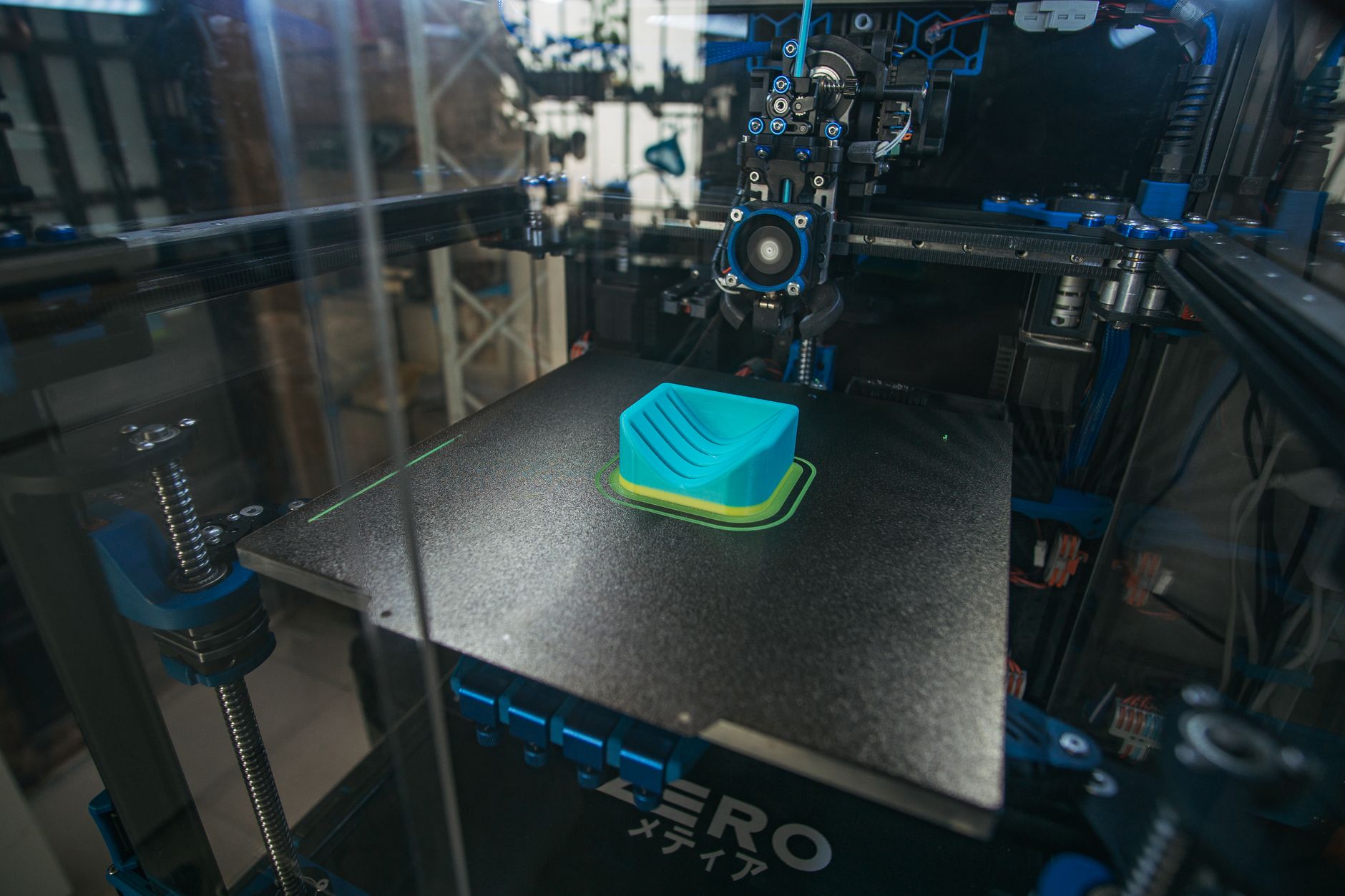
The K1C is the Creality machine for materials that punish ordinary printers. Its enclosed CoreXY frame holds a 220 x 220 x 250 mm build area and pushes a 300°C all-metal hotend. That temperature opens up ABS, ASA, nylon, and carbon fiber filled filaments with less warping. For more enclosed competitors, see our best enclosed 3D printers list.
A hardened nozzle comes stock. Abrasive filaments like carbon fiber PETG or glass-filled nylon will not eat the nozzle after one spool. The enclosure keeps drafts away from the bed, which reduces peeling on wide flat parts. Real speed depends on geometry, but 300 to 400 mm/s is usable for PLA after calibration.
The K1C costs more than an Ender 3, and the smallish build area limits large pieces. You also give up some access because panels and top glass need removal for deep maintenance. Still, this is the top overall Creality pick for advanced users who want speed and material range. You can find current pricing with Check the Creality K1C on Amazon.
Key strengths:
- ✅ Enclosed CoreXY design holds heat for warp-prone materials
- ✅ 300°C hotend and hardened nozzle handle filled nylon and carbon fiber
- ✅ 600 mm/s rated speed with automatic resonance compensation
- ✅ Direct-drive toolhead prints flexible TPU cleanly
- ❌ 220 x 220 x 250 mm volume may feel small for large parts
- ❌ Enclosure panels increase maintenance time
- ❌ Higher price than open-frame Creality options
Who it’s for: Choose the K1C if you need engineering materials, enclosed printing, and high daily throughput.
4. Creality CR-10 Smart Pro , Large-format builds
Size is the headline. The CR-10 Smart Pro features a 300 x 300 x 400 mm build volume, enough for full-size helmets, cosplay armor, and large functional prototypes. A 49-point auto level system reduces the pain of keeping a big bed flat. The Sprite direct-drive extruder feeds TPU better than the old bowden CR-10s. See our best large 3D printers guide for similar machines.
Do not buy this machine for speed. Its rated maximum is around 150 mm/s, and large PETG parts often print better at 60 to 100 mm/s. The bed slinger motion also shakes tall, narrow prints if you push acceleration too far. Use a stable desk and keep the frame square. Bed adhesion matters more on big prints because warping forces are larger.
The open frame means ABS needs an aftermarket enclosure or careful draft shielding. But for large PLA, PETG, and TPU parts, the CR-10 Smart Pro delivers a lot of volume for the money. It is the obvious Creality choice when an Ender 3’s 220 mm square cannot fit your design.
Key strengths:
- ✅ 300 x 300 x 400 mm build volume handles full-size helmets
- ✅ 49-point auto leveling reduces manual bed leveling time
- ✅ Direct-drive Sprite extruder handles TPU and PETG
- ✅ Heated glass bed provides a flat, reusable surface
- ❌ Open frame limits ABS and ASA reliability
- ❌ Slower than the K1C and Ender 3 V3 models
- ❌ Bed-slinger motion can wobble tall parts
Who it’s for: Pick the CR-10 Smart Pro for large-format prints where build volume matters more than speed.
5. Creality Halot Mage 8K , High-detail resin prints
The Halot Mage 8K handles detail work that FDM cannot match. Its 8K mono LCD and 228 x 128 x 230 mm build volume produce smooth surfaces for miniatures, jewelry, and dental models. Resin curing draws fine details that filament layers would smear across. If you are serious about small, high-quality prints, resin is the route.
Resin printing is a workflow, not just a machine. You need nitrile gloves, ventilation, isopropyl alcohol, and a UV curing station. The Halot Mage 8K includes a built-in air filter to reduce odor, but you should still print in a ventilated room. Post-processing takes more time than pulling a part off a PEI bed.
The machine is not suited to large brackets or spare parts. Resin is messier and more expensive per part than PLA. But for miniatures and display pieces, the detail is worth it. Check the Creality Halot Mage 8K on Amazon if you are ready to add resin to your workshop.
Key strengths:
- ✅ 8K mono LCD delivers sharp miniature details
- ✅ Smooth resin surfaces need less sanding than FDM
- ✅ Built-in air filter reduces smell near the printer
- ✅ Compact size fits smaller workspaces
- ❌ Toxic resin requires gloves and ventilation
- ❌ Washing and curing add extra equipment and time
- ❌ Resin cost per print is higher than PLA
Who it’s for: Choose the Halot Mage 8K for high-detail miniatures, jewelry, and dental or sculptural work.
Frequently Asked Questions
Which Creality printer is best for most people?
The Ender 3 V3 SE is best for most people. It costs less, levels itself, and prints PLA, PETG, and TPU reliably at speeds up to 250 mm/s.
What is the fastest Creality printer in 2026?
The K1C is rated at 600 mm/s and uses a CoreXY motion system inside an enclosure. The Ender 3 V3 KE follows at 500 mm/s for open-frame printing.
Can the Creality K1C print carbon fiber filament?
Yes, the K1C has a 300°C hotend and hardened nozzle. Use a dry spool and a hardened nozzle setting, and expect more abrasive wear than standard PLA.
What is the largest Creality FDM build volume on this list?
The CR-10 Smart Pro offers 300 x 300 x 400 mm. It prints full-size helmets and large prototypes but is not as fast as the K1C.
Is resin printing with Creality hard?
The Halot Mage 8K is easy to operate but resin printing requires gloves, ventilation, washing, and curing. It is more involved than FDM.
Are Creality printers good for beginners in 2026?
Yes. The Ender 3 V3 SE has automatic Z offset and CR Touch leveling, which remove the hardest part of older Ender 3 setup.
What Should You Remember?
- Best overall: The Ender 3 V3 SE is the safest starter pick at about $219.
- Best enclosed speed: The K1C reaches 600 mm/s and prints ABS, ASA, and nylon with a 300°C hotend.
- Best large format: The CR-10 Smart Pro builds 300 x 300 x 400 mm parts for cosplay and functional prototypes.
- Best detail: The Halot Mage 8K uses an 8K mono LCD for sharp resin miniatures and jewelry.
- Material match: Check nozzle and bed temperatures before buying; ABS and filled nylon need the K1C.
- Maintenance: Creality machines reward users who learn belt tension, bed leveling, and firmware updates.
This article is for general information only. Always follow your printer manufacturer’s guidelines and material safety data sheets (MSDS) for safe operation.