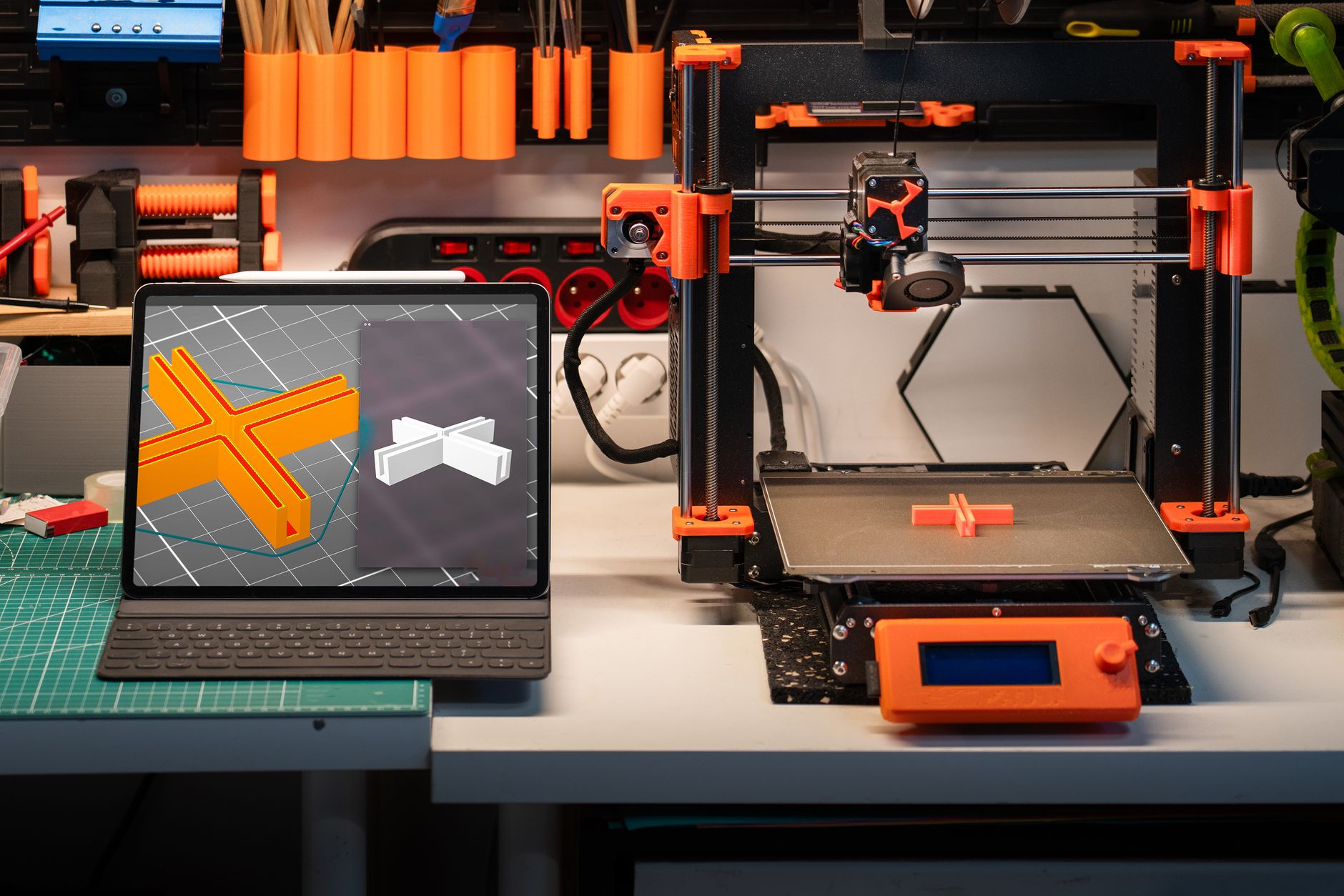
The Original Prusa MK4S is Prusa Research’s current flagship bed-slinger, and it is the machine most people picture when they hear the words reliable FDM printer. The Prague-based company shipped the MK4S as a refresh of the MK4, adding a redesigned high-flow Nextruder cooling fan, a new 0.4 mm nozzle geometry, and a stiffer gantry that cuts ringing at higher speeds. Prusa rates the build volume at 250 x 210 x 220 mm and the maximum print speed at 300 mm/s with input shaping enabled. For a full rundown of how it stacks up against everything else this year, our best 3D printers of 2026 guide is a good place to start.
This comparison is written from the perspective of someone who has actually run these machines and serviced them. I looked at five configurations a MK4S buyer would realistically weigh: the factory-assembled MK4S, the self-build kit, the enclosed Prusa CORE One, the Bambu Lab P1S, and the Bambu Lab A1. The criteria are straightforward. Build volume in millimeters, top speed in mm/s, nozzle and bed temperature ceilings, layer resolution range, enclosure status, and how painful the machine is to fix when something breaks. Prusa publishes all of these specs on its official product pages, and I cross-checked every number against them.
The timing matters because the mid-range FDM market has shifted hard toward enclosed CoreXY machines over the past two years. Bambu Lab’s lineup pushed print speeds past 500 mm/s and made multi-color printing a default expectation rather than a luxury add-on. Prusa responded with the CORE One, its own enclosed CoreXY design, while continuing to sell and support the MK4S as the open-frame workhorse. If you need to print ABS or ASA without warping, an enclosure is close to mandatory, and our guide to enclosed 3D printers explains exactly why. The MK4S is not enclosed, but it works with Prusa’s own enclosure kit and a huge range of third-party ones.
Below you will find a full comparison table, five detailed breakdowns, and a set of buying notes. I have flagged the parts of the MK4S experience that frustrate owners, because the machine is not perfect. The frame is open, the assembly takes hours if you buy the kit, and the stock 0.4 mm nozzle is not the fastest hotend you can bolt onto a printer. Still, for anyone who wants a printer they can diagnose with a multimeter and a screwdriver, the MK4S is tough to beat.
How Do the Top Options Compare?
| Printer | Best For | Build Volume | Max Speed | Enclosed | Check Price |
|---|---|---|---|---|---|
| Original Prusa MK4S (Assembled) | Best overall for reliability and repairability | 250 x 210 x 220 mm | 300 mm/s | No | Check price |
| Original Prusa MK4S Kit | Best for makers who want to build it themselves | 250 x 210 x 220 mm | 300 mm/s | No | Check price |
| Prusa CORE One | Best enclosed Prusa for engineering materials | 250 x 220 x 270 mm | 600 mm/s | Yes | Check price |
| Bambu Lab P1S | Best enclosed speed for the money | 256 x 256 x 256 mm | 500 mm/s | Yes | Check price |
| Bambu Lab A1 | Best budget open-frame alternative | 256 x 256 x 256 mm | 500 mm/s | No | Check price |
Rated speeds are manufacturer maximums measured under ideal conditions. Real-world PLA printing typically runs at 50 to 70 percent of those figures once cooling and surface quality are accounted for. Always confirm current specs on the manufacturer’s product page before buying.
1. Original Prusa MK4S (Assembled) , Best overall open-frame FDM printer for reliability and repair
The factory-assembled MK4S is the version most buyers should order. It shows up fully built, and the setup ritual is short. Cut the zip ties, pull the foam blocks off the gantry, plug in the power supply, and run the built-in self-test. That test checks the load cell, the thermistors, the fans, and the belt tension in about ten minutes. The Nextruder toolhead carries a load-cell probe inside the nozzle itself, so Z-offset is measured rather than guessed. You will not spend your first weekend sliding a sheet of paper under a hot nozzle.
The hardware numbers matter. Build volume is 250 x 210 x 220 mm, which fits most functional parts and a full set of miniature bases. Prusa rates the maximum print speed at 300 mm/s with input shaping switched on, and the machine cruises at 150 to 200 mm/s on PLA without visible ringing. The hotend reaches 290C and the heatbed tops out at 120C, so PETG, ASA, ABS, and polycarbonate blends are all usable. Layer heights run from 0.05 mm for detail work up to 0.35 mm for rough drafts. Our 3D printing materials guide breaks down which filaments actually need those higher temperatures.
The MK4S revision over the original MK4 is mostly about cooling. Prusa redesigned the fan shroud and moved to a high-performance blower that pushes air across the nozzle from three directions. That change alone lets you print steeper overhangs in PLA at higher volumetric flow. The new nozzle geometry also handles abrasive filament slightly better, though you still want a hardened nozzle for carbon-fiber blends. If you already own an MK4, Prusa sells an upgrade kit that swaps the toolhead parts instead of the whole printer, which is a much cheaper path to the same performance. Check price
Key strengths:
- ✅ Arrives assembled and calibrated, so you can print within an hour of unboxing
- ✅ Load-cell bed probing removes Z-offset guesswork entirely
- ✅ Every spare part is sold individually, from thermistors to the whole Nextruder assembly
- ✅ Open firmware and a huge community mod base keep the machine current for years
- ✅ Quieter in operation than the enclosed CoreXY competition at similar speeds
- ❌ Open frame means ABS and ASA will warp without a separate enclosure
- ❌ Top speed of 300 mm/s trails the 500 to 600 mm/s machines at the same price point
- ❌ Stock 0.4 mm nozzle is not hardened, so abrasive filament wears it quickly
Who it’s for: Buy the assembled MK4S if you want a printer you can repair yourself and keep running for five years or more without vendor lock-in.
2. Original Prusa MK4S Kit , Best for makers who want to build and understand their printer
The MK4S Kit is the same printer delivered as a box of parts. Assembly takes most people four to six hours spread across an evening or two, and Prusa’s online manual is the best in the hobby. Every step has photos, and the comment thread under each step already contains the answer to whatever mistake you are about to make. Building it yourself means you know exactly where every screw goes, which pays off the first time you need to replace a thermistor or re-tension a belt.
Specs are identical to the assembled unit. Build volume is 250 x 210 x 220 mm, top speed is 300 mm/s, the hotend reaches 290C, the bed reaches 120C, and the minimum layer height is 0.05 mm. The only variable is your own calibration work. Prusa’s firmware walks you through first-layer calibration and belt tension checks, and the load-cell probe removes the guesswork from Z-offset. If you have never assembled a machine before, our how to start 3D printing guide covers the tools and the order of operations you need.
The kit is the better value if your time is cheap and your curiosity is high. It is the wrong call if you need to be printing the day the box lands. Parts can arrive slightly out of alignment, and a cross-threaded screw is a genuine possibility when you rush. Follow the manual one page at a time and the build is straightforward. Skip steps and you will spend longer debugging than you saved. Check price
Key strengths:
- ✅ Costs meaningfully less than the assembled version for identical hardware
- ✅ Teaches you the full mechanical layout, which speeds up every future repair
- ✅ Manual quality is outstanding, with photos and community answers on every step
- ✅ Identical print quality to the assembled unit once calibration is complete
- ❌ Four to six hours of build time before your first print
- ❌ Rushing the build leads to cross-threaded screws and alignment problems
- ❌ Requires a decent set of hex drivers and some patience with cable routing
Who it’s for: Choose the kit if you enjoy the build process and want to save money while learning how the machine works inside and out.
3. Prusa CORE One , Best enclosed Prusa for engineering materials and batch printing
The CORE One is Prusa’s answer to the enclosed CoreXY wave that Bambu Lab started. It moves the toolhead on a fixed gantry inside a sealed chamber, which cuts moving mass and lets the machine accelerate harder without shaking the frame. Build volume is 250 x 220 x 270 mm, so it is taller and slightly wider than the MK4S. Prusa builds in a HEPA and activated carbon filter for ABS and ASA fumes, plus a heated chamber option for high-temperature materials.
Speed is the headline difference. Prusa rates the CORE One well above the MK4S, and on PLA it finishes most parts in roughly half the time. Layer resolution and temperature ceilings are similar, so the gain is throughput rather than capability. Anyone printing batches of parts for sale should look hard at CoreXY geometry. Our fastest 3D printers roundup compares real benchmarks instead of marketing numbers. If you plan to run nylon or polycarbonate, the Simplify3D materials guide lists the chamber temperatures those filaments actually want.
The trade-offs are real. The CORE One costs noticeably more than the MK4S, and the enclosed chamber makes quick nozzle access harder. If you mostly print PLA and PETG, the open-frame MK4S is easier to live with day to day. Buy the CORE One if you print ABS, ASA, or nylon regularly, or if you want the speed without giving up Prusa’s repairability. It is the natural upgrade path for anyone who has outgrown the MK4S frame.
Key strengths:
- ✅ Fully enclosed chamber with HEPA and carbon filtration for ABS and ASA fumes
- ✅ CoreXY motion system delivers far higher acceleration than the MK4S bed-slinger
- ✅ Taller 250 x 220 x 270 mm build volume handles bigger single-piece parts
- ✅ Keeps Prusa’s open parts catalog and repairability, unlike most enclosed rivals
- ✅ Chamber heater option opens the door to polycarbonate and nylon blends
- ❌ Costs substantially more than the MK4S for similar layer resolution
- ❌ Enclosed design makes routine nozzle maintenance slower
- ❌ Overkill if you only ever print PLA and PETG
Who it’s for: Pick the CORE One if you print engineering filaments regularly or need higher throughput without abandoning Prusa’s support model.
4. Bambu Lab P1S , Best enclosed speed for the money
The P1S is the machine most MK4S shoppers cross-shop against. It is a fully enclosed CoreXY printer with a 256 x 256 x 256 mm build volume, a 300C hotend, and a rated top speed of 500 mm/s. In practice it holds 200 to 250 mm/s on PLA reliably, which is faster than the MK4S out of the box. Bambu Lab publishes the full spec sheet on its official product pages, and the numbers mostly hold up under testing.
The P1S wins on speed, enclosure, and price. It also supports the AMS multi-material unit, which swaps between four spools without manual intervention. Setup is close to appliance-like. Unbox, bolt on the touchscreen, run the calibration routine, print. Where it loses is repairability. Bambu uses more proprietary parts, the firmware is closed, and community modifications are constrained compared to Prusa’s open design. If the mainboard dies, you are ordering from Bambu rather than from a dozen third-party vendors.
Noise is another factor. The P1S is loud, and the chamber fans add to it. The MK4S is quieter at comparable speeds. If your printer lives in a shared room, that matters more than the spec sheet suggests. Layer resolution matches the Prusa at 0.05 mm minimum with a 0.4 mm nozzle, and the 300C hotend edges out the MK4S by ten degrees. Decide whether the enclosure and speed are worth giving up on the open parts catalog. Check price
Key strengths:
- ✅ Fully enclosed chamber handles ABS and ASA without draft shields
- ✅ 500 mm/s rated speed with 256 x 256 x 256 mm build volume, bigger than the MK4S
- ✅ 300C hotend covers more high-temperature filament options than the Prusa
- ✅ AMS multi-color unit works out of the box with four spools
- ❌ Proprietary parts and closed firmware limit long-term modification
- ❌ Noticeably louder than the MK4S during normal printing
- ❌ Repairs depend on Bambu’s supply chain rather than open third-party vendors
Who it’s for: Choose the P1S if you want an enclosed, fast, multi-color printer that mostly works without tinkering and you do not plan to modify it.
5. Bambu Lab A1 , Best budget open-frame alternative to the MK4S
The A1 is Bambu Lab’s open-frame bed-slinger, and it is the closest thing to a direct budget rival for the MK4S. Same 256 x 256 x 256 mm build volume as the P1S, same 500 mm/s rated speed, but no enclosure and a lighter gantry. It ships with automatic bed leveling, flow calibration, and vibration compensation that works well without tuning. For a first printer, that out-of-box experience is genuinely hard to argue with.
Where the A1 beats the MK4S is price and setup time. Where the MK4S beats the A1 is longevity. Prusa sells every spare part individually, documents every failure mode, and keeps supporting machines for years after release. Bambu’s support model is newer and more centralized, so a discontinued part becomes a bigger problem. A hobbyist who wants to fix and modify things gets more mileage from the Prusa. Someone who just wants to print toys and household brackets will find the A1 difficult to walk away from.
If you plan to print miniatures or highly detailed models, resolution matters more than top speed. Both machines handle a 0.4 mm nozzle down to 0.05 mm layers, so the difference comes down to part cooling and tuning patience. The MK4S has the stronger stock cooling setup after the MK4S revision. The A1 has faster default slicer profiles. Our best 3D printer for miniatures guide covers which setups actually produce clean detail at small scale. Check price
Key strengths:
- ✅ Costs less than the MK4S while matching its 0.05 mm minimum layer height
- ✅ Automatic bed leveling and flow calibration work without manual tuning
- ✅ 256 x 256 x 256 mm build volume is larger than the Prusa’s in every axis
- ✅ Fast default profiles mean usable prints within minutes of unboxing
- ❌ No enclosure, so ABS and ASA require a separate build or a draft shield
- ❌ Spare parts and firmware are more locked down than Prusa’s open platform
- ❌ Bambu’s long-term support history is far shorter than Prusa’s decade of documentation
Who it’s for: Get the A1 if you want the easiest possible start to FDM printing and you are not planning to repair, modify, or keep the machine for a decade.
Frequently Asked Questions
What is the build volume of the Original Prusa MK4S?
The MK4S has a build volume of 250 x 210 x 220 mm. That is large enough for most functional parts, a full set of miniature bases, and small enclosure panels, but it is smaller than the 256 x 256 x 256 mm chamber on the Bambu Lab P1S.
How fast does the Prusa MK4S actually print?
Prusa rates the MK4S at up to 300 mm/s with input shaping enabled. In real prints, expect 150 to 200 mm/s on PLA for good surface quality, and slower on PETG or ABS where cooling and warping become the limiting factors.
Does the MK4S need an enclosure to print ABS or ASA?
It does not strictly require one, but ABS and ASA warp badly in open air without a draft shield or a warm room. An enclosure keeps chamber temperature stable and filters fumes. If enclosed printing is a priority, the Prusa CORE One is the better starting point.
Is the MK4S Kit worth building yourself?
Yes, if you have four to six hours and want to understand the machine. The kit costs less than the assembled version and the build process teaches you how every component fits together. Buy the assembled unit if you need to print the day it arrives.
What layer heights can the MK4S print?
Layer heights range from 0.05 mm up to 0.35 mm with the stock 0.4 mm nozzle. Dropping below 0.05 mm is possible with a smaller nozzle, but it returns very little extra detail for the time it costs.
Does the MK4S support multi-color printing?
Yes, through the MMU3 multi-material upgrade, which feeds up to five filaments into a single nozzle. It is a separate purchase and adds setup and tuning time, but it handles multi-color prints and soluble support material without manual swaps.
What Should You Remember?
- Build volume: The MK4S prints within a 250 x 210 x 220 mm envelope, so plan around it for large single-piece parts.
- Speed ceiling: Prusa rates it at 300 mm/s, but 150 to 200 mm/s on PLA is where surface quality stays clean.
- Temperature range: A 290C hotend and a 120C bed cover PLA, PETG, ASA, ABS, and most polycarbonate blends.
- Repairability wins: Every part is sold individually and the firmware is open source, which is why MK4S machines stay in service for years.
- Enclosure matters: For ABS and ASA, buy the CORE One or a third-party enclosure instead of fighting warping in open air.
- Kit versus assembled: The kit saves money and teaches you the machine, but it costs four to six hours of build time.
This article is for general information only. Always follow your printer manufacturer’s guidelines and material safety data sheets (MSDS) for safe operation.